- Page d'accueil /
- Produits de bureau /
- Électronique de bureau /
- Autres équipements de bureau /
- Label Makers /
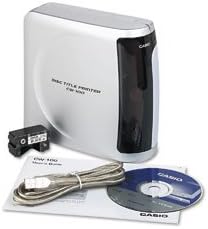
- Casio CW-100 CD Label Printer
0 ratings

Numéro d'article:
1826083
Casio CW-100 CD Label Printer
Numéro d'article:
1826083
XOF 246389
Price Details
Excluding Shipping & Custom charges ( Shipping and custom charges will be calculated on checkout )
*All items will import from États-Unis
0 ratings
Écrire un commentaire
En stock
 Importé depuis la boutique USA
QTY:
Commandez maintenant et recevez votre commande aux alentours du Mercredi, Août 26
Transaction sécurisée
Ubuy s'engage à protéger votre sécurité et votre confidentialité. Notre système avancé de sécurité des paiements garantit la confidentialité en chiffrant vos informations lors de la transmission grâce aux protocoles AES (Advanced Encryption Standards) et SSL (Secure Socket Layer). Vos coordonnées de paiement sont 100 % sécurisées car nous ne partageons pas vos informations de paiement avec des vendeurs tiers.
Nos meilleurs partenaires logistiques


Creates crisp, clear professional-looking CDs without the hassle of applying labels.

Livraison
rapide

Retour
gratuit*

Emballage sécurisé

Produits 100 % originaux

Conformité PCI DSS

Certifié ISO 27001


Note: Step Down Voltage Transformer required for using electronics products of États-Unis store (110-120). Recommended power converters Acheter maintenant.


Ce qui se démarque
Versatile Labeling
The Casio CW-100 allows users to print custom CD labels and covers, accommodating various media types, enhancing organization and personalization for music lovers and professionals alike.
High-Quality Prints
With superior print resolution, the CW-100 delivers crisp and vibrant label designs, ensuring that every detail stands out, making it perfect for presentations and professional use.
User-Friendly Interface
The intuitive interface and easy-to-use software of the CW-100 simplify the labeling process, enabling users to create and print labels quickly, saving time without compromising on quality.
Détails du produit
- Prints on up to 40 discs in 5 colors per ribbon cartridge - red, green, blue, silver, or black
- 300 DPI Resolution for sharp and professional results
- Uses any TrueType font for custom disc titles
- Direct thermal printing technology ensures instant drying and no damage to discs
- Auto-turn function for printing on upper and lower areas of discs in one operation
- Can import BMP or JPG graphics and preview label appearance on screen
| Printer Type | Thermal |
| Other Special Features of the Product | CD Printing |
| Printer Output Type | Monochrome |
| Item Weight | 3.7 Pounds (1.68 kg) |
| Print media | Labels |
| Compatible Devices | PC |
| Maximum Copies Per Run | 40 |
| Ink Color | red, green, blue, silver, black |
| Additional Printer Functions | Print Only |
| Control Method | App |
| Processor Count | 1 |
| Number of Drivers | 1 |
| Resolution | 300 x 300 |
| Maximum Media Size | 120mm |
| Maximum Sheet Capacity | 40 |
| Maximum print Resolution Color | 300 dots_per_inch (762 cm) |
| Maximum Print Resolution Black and White | 300 dpi |
| Dual-sided printing | No |
| Duplex | Simplex |
| Maximum Copy Resolution Color | 300 dpi |
| Maximum Copy Resolution Black and White | 300 dpi |
| Brand | Casio |
| Model Name | CW 100 |
| Model Number | CW-100-IH |
| Built-In Media | AC Adapter, USB Cable, Ink Ribbon Cassette, Practice CD-R, CD-ROM with CD-R Title Printer Application, CD Layout Ruler |
| Series Number | 100 |
| Model Series | CW |
| Specific Uses For Product | CD Label Printing |
| UPC | 999999049025 079767161835 079767168780 |
| Global Trade Identification Number | 00079767161835 |
| Manufacturer | #N/A! |
| Unit Count | 1.0 Count |
| Color | silver |
| Color Depth | 1 bits_per_pixel |
| Printer Connectivity Type | USB |
| Hardware Interface | USB |
| Total USB 2.0 Ports | 1 |
| Total Usb Ports | 1 |
| Connectivity Technology | USB |
| Printing Technology | Thermal |
| Special Feature | CD Printing |
| Printer Output | Monochrome |
| Included Components | AC Adapter, USB Cable, Ink Ribbon Cassette, Practice CD-R, CD-ROM with CD-R Title Printer Application, CD Layout Ruler See more |
À qui est-ce destiné ?

-
Home Users
Ideal for individuals wanting to organize personal media collections with custom labels and designs.
-
Small Businesses
Great for small businesses needing to create professional labels for CDs, DVDs, and promotional materials.
-
Hobbyists
Perfect for craft enthusiasts who enjoy creating unique, personalized labels for various projects.

-
High-Volume Users
Not suitable for those who require frequent, high-volume printing due to relatively slower print speeds.
DESCRIPTION DU PRODUIT
Casio CW-100 CD Label Printer
About This Item
Introducing the Casio CW-100 CD Label Printer, the perfect solution for all your labeling needs. This compact and versatile printer is designed to create professional-quality CD labels with ease. With the Casio CW-100 Label Printer, you can say goodbye to the hassle of handwriting labels or dealing with messy ink cartridges.
This printer uses thermal printing technology, which means that it prints directly onto the labels using heat. This ensures that your labels look crisp, clear, and smudge-free every time. Whether you need to print labels for organizing your CD collection, creating professional presentations, or even customizing gifts, the Casio CW-100 Printer has got you covered. It offers a wide range of label templates and customization options, allowing you to create labels that suit your unique style and needs.
This Casio Label Printer is also incredibly convenient to use. It features a wireless connectivity option, so you can easily send your label designs from your computer or mobile devices. Additionally, its portable design makes it perfect for on-the-go use or for setting up a small labeling station in your workspace. But don't let its compact size fool you - the Casio CW-100 Label Printer is a powerhouse when it comes to performance.
It boasts high-speed printing capabilities, allowing you to print multiple labels in a matter of minutes. Plus, it is built to last, thanks to its durable construction and reliable functionality. In summary, the Casio CW-100 CD Label Printer is the ultimate labeling solution. With its professional-quality prints, versatile features, and user-friendly design, it is the perfect addition to any office, home, or personal workspace.
Say goodbye to messy handwriting and hello to convenience and efficiency with the Casio CW-100 Label Printer.
Vous avez une question ? Chattez avec nous
Questions et réponses des clients
-
question:
What type of labels can I print with the Casio CW-100 CD Label Printer?
répondre: The Casio CW-100 CD Label Printer is designed to print a variety of labels, primarily optimized for CD and DVD media. It supports standard-sized labels specifically made for discs, ensuring that your labels fit perfectly without any trimming. Additionally, you can create labels for other products like gifts, organizational tags, and even customized stickers, giving you versatility in your labeling projects. -
question:
How does the ink system work in the Casio CW-100?
répondre: The Casio CW-100 utilizes a thermal transfer printing system that ensures high-quality prints. This system employs heat to transfer ink from a ribbon onto the label material, resulting in vibrant colors and sharp images. Users find this method excellent for creating detailed designs and text that stand out, making it perfect for custom CD covers or professional presentations. -
question:
Can I create custom designs using the Casio CW-100?
répondre: Yes, you can create custom designs using the Casio CW-100 CD Label Printer. The device comes with built-in templates and features that allow users to personalize labels with text, graphics, and images. Whether you’re labeling your music collection or creating unique event invitations, the user-friendly interface makes it easy to unleash your creativity and produce professional-looking labels. -
question:
Is the Casio CW-100 compatible with my computer?
répondre: The Casio CW-100 CD Label Printer is compatible with both Windows and Mac operating systems. It connects via USB, allowing for seamless integration with your computer. This compatibility makes it convenient for users to design and print labels directly from popular design software or the included software package, enhancing your productivity when printing labels. -
question:
What font options are available with the CW-100?
répondre: The Casio CW-100 offers a variety of font styles and sizes, enabling users to customize their labels to their liking. A wide selection of built-in fonts allows for creative flexibility, whether you're labeling a personal project or a corporate presentation. Additionally, the ability to adjust font sizes and apply styles such as bold, italic, or underlined enhances the appeal of your labels. -
question:
Can the CW-100 print in color?
répondre: Yes, the Casio CW-100 CD Label Printer can print in color, providing an opportunity to produce vibrant and visually appealing labels. It utilizes a high-quality ink system that allows for colorful graphics and clear text, making your discs more attractive and professional-looking. This feature is particularly beneficial for promotional materials, personal projects, or custom gifts. -
question:
How do I load and replace labels in the CW-100?
répondre: Loading and replacing labels in the Casio CW-100 is a straightforward process. Simply open the cartridge compartment, remove the old label roll, and insert the new one, ensuring it is aligned properly. Follow the on-screen prompts for loading, and you’ll be ready to create labels swiftly. This user-friendly design minimizes downtime and maximizes efficiency, ideal for busy environments or home use. -
question:
What are some creative uses for the Casio CW-100?
répondre: The Casio CW-100 can be utilized for a range of creative applications beyond just CD labeling. For instance, you can create custom stickers for events, organize your home with labeled storage boxes, or craft personalized gifts. This versatility allows users to think outside the box and maximize the printer's potential for various projects, facilitating organization and creativity. -
question:
How does the CW-100 compare to other label printers?
répondre: The Casio CW-100 stands out in the label printer market due to its specialized design for CDs and DVDs combined with high-quality color printing capabilities. Its thermal transfer technology ensures durability against fading and smudging, which is often a concern with standard inkjet printers. When compared to other label printers, the CW-100’s focus on media labels makes it a top choice for users looking for specialized applications. -
question:
Where can I buy Casio CW-100 CD Label Printer in Cote dIvoire?
répondre: You can purchase the Casio CW-100 CD Label Printer from Ubuy in Cote dIvoire. Ubuy offers a wide selection of Casio products, ensuring you’ll find what you need in a reliable online store known for its comprehensive range and customer service.
Casio Label Makers CW-100-IH Editorial Review
The Casio CW-100 CD Label Printer is a reliable and easy-to-use printer for creating labels on CDs. It is compatible with Windows XP and Windows 7 Pro 64 bit operating system. However, it does not print CD logos and is not compatible with Mac computers. The printer is capable of printing different fonts, sizes, and arrangements for a simple business-like print on a silver disc.
Avis et évaluations clients
1 évaluations des clients
-
5 étoile
100%
-
4 étoile
0%
-
3 étoile
0%
-
2 étoile
0%
-
1 étoile
0%
Donnez votre avis sur ce produit
Partagez votre avis avec d'autres clients
Avantages
- Reliable and easy-to-use
- Compatible with Windows XP and Windows 7 Pro 64 bit
Les inconvénients
- Does not print CD logos
Platform Trust & Buyer Confidence

MA
Mohammad
Verified buyer
“Excellent quality and original too,when ubuy send original things I will appreciate that ,I very satisfied thank you”
23 July 2026 · via Trustpilot
CK
Chitra
Verified buyer
“The order and delivery progress was communicated very well. Package arrived within the estimated time. Products arrived as expected in good condition.”
22-Jul-26 · via Trustpilot
K
kund
Verified buyer
“Good supply of products. Safe payment methods, and shipment worldwide! Genuine products.”
23-Jul-26 · via Trustpilot
OO
Onesi
Verified buyer
“Was my first time buying a product from Ubuy, but I found it so helpful. This is reliable. Gonna place a new order!”
22 July 2026 · via Trustpilot
SJ
SAO JOHN
Verified buyer
“Ubuy is a great online platform to buy stuff. Reliable, fast delivery time and great value for money. I've been using Ubuy online shopping platform for three years now and will continue to do so.”
23 July 2026 · via Trustpilot
Paiement sécurisé
Global Delivery
Easy Returns
Genuine Products
Historique des prix du produit
Informations importantes
- Limitations : Pour les produits expédiés à l'international, veuillez noter que toute garantie du fabricant peut ne pas être valide ; les options de service du fabricant peuvent ne pas être disponibles ; les manuels, instructions et avertissements de sécurité des produits peuvent ne pas être dans les langues du pays de destination ; les produits (et les matériaux qui les accompagnent) peuvent ne pas être conçus conformément aux normes, spécifications et exigences d'étiquetage du pays de destination ; et les produits peuvent ne pas être conformes à la tension et aux autres normes électriques du pays de destination (nécessitant l'utilisation d'un adaptateur ou d'un convertisseur le cas échéant). Il incombe au destinataire de s'assurer que le produit peut être importé légalement dans le pays de destination. En cas de commande auprès d'Ubuy ou de ses filiales, le destinataire est l'importateur officiel et doit se conformer à toutes les lois et réglementations du pays de destination.
- Tous les produits listés sur Ubuy ne sont pas à vendre, Ubuy étant un moteur de recherche mondial. Les produits sont soumis aux réglementations en matière d'exportation et de commerce.
XOF 246389
Commandez maintenant et recevez votre commande aux alentours du Mercredi, Août 26
This item is not restrict in my country.(Please click on above link if this item is not restrict in your country, So our team will review and allow.)
QTY:
Transaction sécurisée
PCI DSS compliant and ISO 27001:2022 certified, with encrypted payments and full buyer protection on every order.
Nos meilleurs partenaires logistiques
Livraison transfrontalière la plus rapide
Caractéristiques et avantages
- Auto-loading and auto-turn saves time and improves performance
- Utilizes any TrueType fonts available via Mac.
- 300 dpi print resolution.
- Includes USB cable, software, black ink ribbon, CD-R and AC adapter.
- Can print on up to 40 discs in 1 of 5 colors per ribbon cartridge.
- Uses any type of TrueType font.
Ubuy Assurance
Experience worry-free shopping with 100% original products, PCI DSS-compliant payment security, ISO 27001-certified data protection, the fastest cross-border delivery, free returns *, and secure packaging on every order.